Learn
Using CAIC Products
Below is a description of the products the CAIC issues daily from November through May. For information on basic avalanche safety, see Basic Avalanche Safety Info.
The CAIC issues three primary products.
Finding your forecast
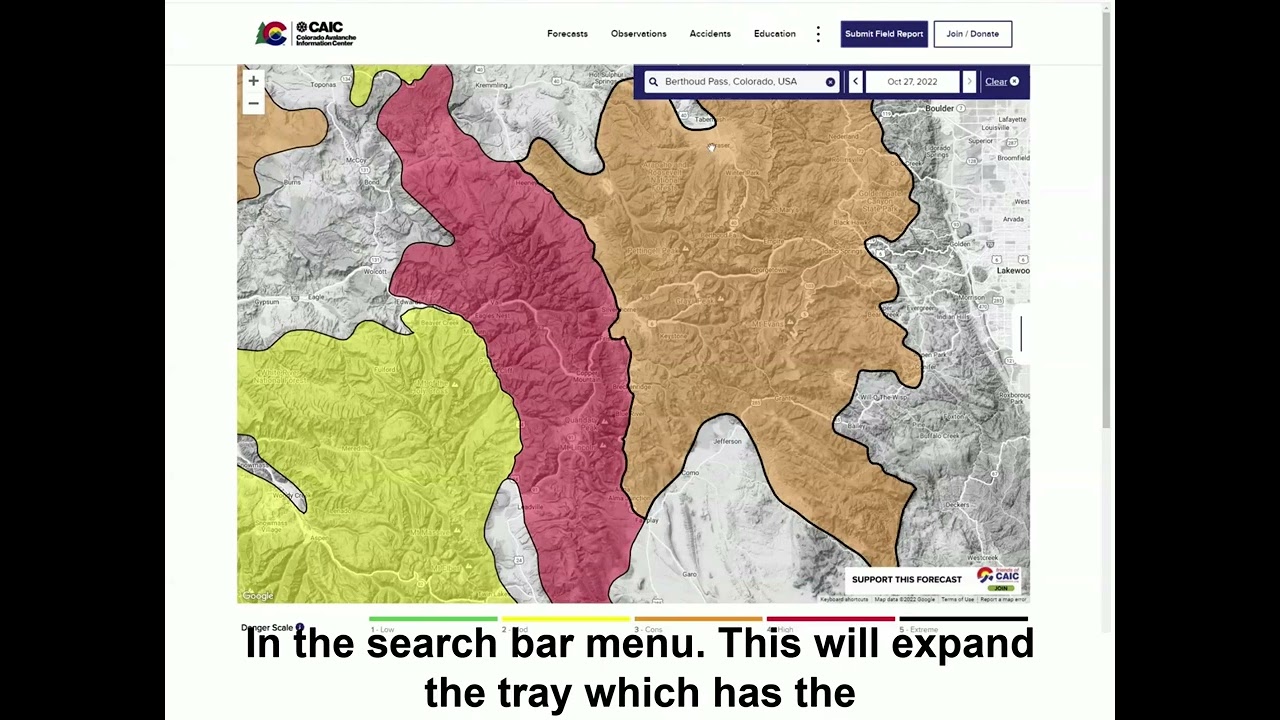
The CAIC forecasts backcountry avalanche and mountain weather conditions for the mountains of Colorado. Your primary interaction with the CAIC website will be through the Homepage which centers on a map of the backcountry forecast zones. You can access Backcountry Avalanche forecasts by clicking on your desired location on the homepage map, or by searching for a location in the search bar in the upper right corner of the homepage map.

Forecasts and regional discussions
Backcountry Avalanche forecasts and Regional Discussions are issued by 4:30pm daily. Forecasts include avalanche danger by elevation for the following two days. The Forecasts may have up to three Avalanche Problems, with aspect elevation, likelihood, and expected size described graphically. A paragraph of text provides additional details.
Regional discussions have no fixed format and may include analysis of relevant observations, technical details on the snowpack, and thoughts on the impact of future weather.
A tray on the right hand side of the homepage will populate with the forecast details, and will default to the first tab, Avalanche Forecast. The second tab will access the Regional Discussion, and the third tab will access the point weather forecast tables.
Backcountry weather forecasts
Backcountry Weather forecasts are issued for 21 points across the state twice daily, by 6:00 am and 12:00 pm. The Weather forecasts are for the next 36 hours. All of the weather forecast points are presented in tabular format, and are grouped by region: Northern Mountains, Central Mountains, and Southern Mountains. You can obtain your weather forecast by clicking Forecasts→ Weather Forecast or by retrieving a backcountry avalanche forecast and selecting the third tab in the forecast details tray.

Submitting and viewing field reports
Field reports from people in the backcountry help CAIC forecasters understand what is happening across the state. The first video walks through submitting a report on the observation platform.
The second covers finding what others have shared: viewing, filtering, and sorting reports on the Observations page.

